
The right tech, at the right job, on time.
Assign jobs with start times and deadlines, see everything on a calendar and send it straight to your tech's phone. Your crew accepts it in the app, and you see it the moment they do.
Job Scheduling & Dispatch in three steps.
Create the job
Customer, address, services, priority and time.
Assign a tech
Pick who goes. The job lands on their phone instantly.
Tech accepts
They accept or decline in one tap and you see it live.
Plan the week at a glance
The calendar shows every scheduled job by day and by tech. Drag in the next job, set the start time and deadline, and you're done.
- Start times and deadlines
- Upcoming, active and completed jobs
- Avoid overlaps and delays
Straight to the crew's phone
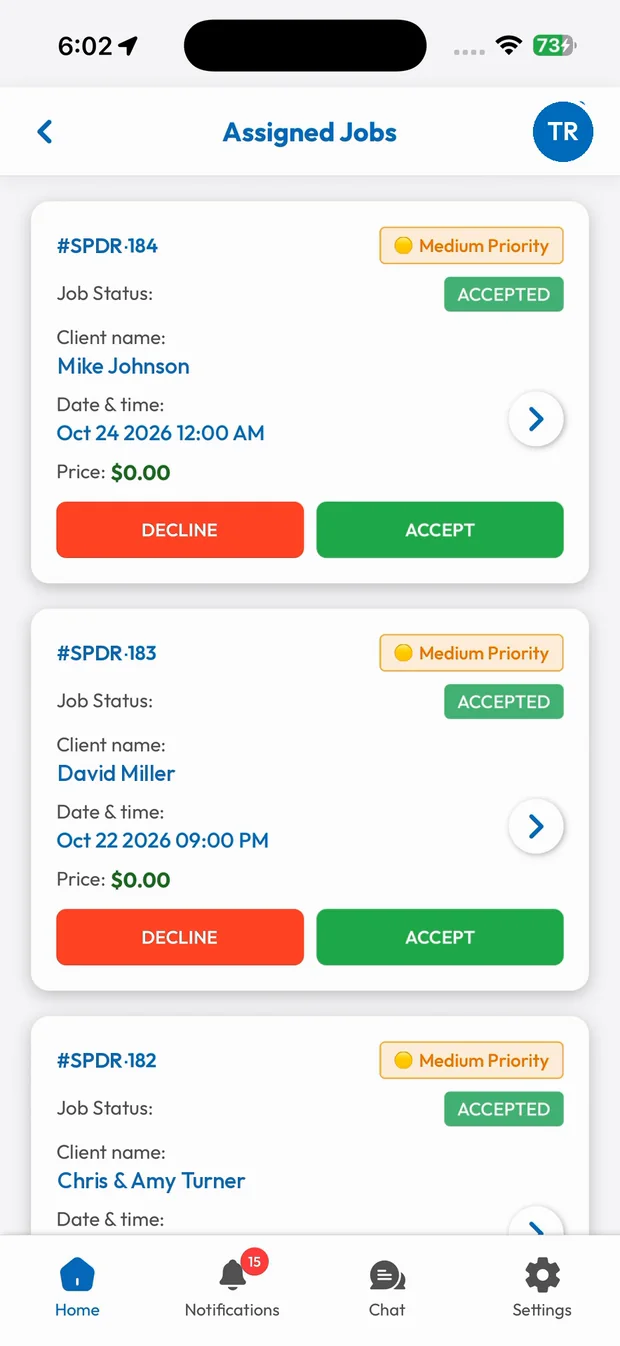
Assigned jobs show up in the employee app with the customer, address, date, time and services. Your tech accepts it, and it moves to their active jobs.
- Accept or decline in one tap
- Full job details on the phone
- Live status back to the office
What you get with Job Scheduling & Dispatch.
Calendar view
See upcoming, active and completed work by day so nothing overlaps.
Instant dispatch
Jobs land on your tech's phone with every detail they need.
Priority levels
Mark urgent work so it gets handled first.
No more phone tag
Techs accept jobs in the app, so you know who's on what.
Trades that rely on Job Scheduling & Dispatch
Related features
Live Job Tracking
On the way, arrived, started, finished. Everyone knows where the job stands.
Learn moreEmployee Mobile App
Jobs, navigation, pricing, chat and payments in your crew's pocket.
Learn moreOnline Booking & Appointments
Let customers book open time slots and send reminders automatically.
Learn moreRun your business the easy way.
Start your 15-day free trial or book a free demo. We'll set SmartTrack up with you, step by step.